Get the latest articles on QR Codes & Digital Business Cards
QR Code Customization
Learn how to customize different elements of the QR Codes
QR Code Buying Guide
Features to look out for, in your QR Code pricing plan
QR Code Analytics
QR Code analytics and use cases
Dynamic QR Codes
What it is, how to create, and track
Digital Business Card Buying Guide
Feature based plans, for your business card
Unique Angles
Your front-row seat to the evolving world of connected marketing experiences
Uniqode’s solution has made our lives a lot easier. Creating QR Codes is quick, and being able to track their performance has proven to be essential for our business.
Circle QR Code Generator: Create Round QR Codes That Scan Anywhere
Create round QR Codes with your brand colors and logo and track every scan for free
What is a circle QR Code?
A circle QR Code is a customized standard QR Code with a circular frame applied to its outer border. The underlying QR Code matrix stays square, which is why it scans on any smartphone camera without a special app.
Can you actually create a round QR Code?
Many wonder if creating a circular QR Code is possible because common knowledge says otherwise. For example, this user at Stack Overflow tried to create a circular QR Code from scratch, but it wasn’t scannable. So what went wrong here?
So, what is happening here?
While QR Codes can appear circular, their functional region must be square (hence the confusion). In the above example, the person successfully created a round QR Code, but they messed up the code’s structure, making it unscannable.
How to make a circle QR Code in 4 steps
To create a round QR Code, you’ll need a QR Code generator where you can customize the code and add a circular frame. Uniqode's QR Code generator handles this automatically, so your code stays scannable by any smartphone camera. Here are four steps to create a round QR Code on Uniqode.
Before you proceed
You can create a static circle QR Code for free. But to create a dynamic circle QR Code, consider creating a Uniqode account, which comes with a package of benefits:
Step 1: Choose your QR Code type and enter your data
Step 2: Customize with a circle shape and set error correction
Step 3: Download your circle QR Code
Step 4: Download your circle QR Code
Common myths about circular QR Codes
Round QR Codes come with a fair amount of misinformation around how they work and how reliable they are. Most of it stems from early DIY attempts that broke the code's structure. Here's what's actually true.
Myth 1: Circular QR Codes are always proprietary
Myth 2: Circular QR Codes are harder to scan
If you create a circular QR Code correctly, there is no significant difference in scannability. If a round QR Code is not working, the reason is because of excessive customization that impact its scannable areas. Premium generators like Uniqode include real-time scannability scoring during design. You don’t have to manually set error correction levels to create a QR Code that works.
Myth 3: You need a special app to scan a circular QR Code
Any smartphone camera app can scan a standard circle QR Code. No third-party scanner required. The circular appearance is purely cosmetic and doesn't change how the code is read.
Circle vs. square QR Codes: When to use each
Circle QR Codes work the same as square ones under the hood. The difference is in how people respond to them. Here's where that difference actually matters.
It grabs attention in a sea of square QR Codes. The round shape is unexpected on billboards, packaging, and digital signage. That visual contrast is enough to make people pause and scan.
It fits where square QR Codes look out of place. Bottle caps, round labels, coasters, and packaging lids all suit a circular design. A square code on a round surface looks like an afterthought.
It nudges more people to scan. People are conditioned to expect square QR Codes. A round one creates just enough curiosity to push someone from noticing to scanning.
What makes Uniqode's circle QR Code generator different
Most circle QR Code generators let you pick a round frame and stop there. Uniqode adds real-time scannability validation, bulk creation, and post-print editing to make sure your codes work as good as they look.
1. Real-time scannability score: validate before you download
Uniqode is the only circle QR Code generator that tests scannability in real time while you design. Set error correction, apply your circular shape, add your logo. The scannability score updates live. If the circular masking or customization has degraded the code, you fix it in the editor. Not at the print shop.
For CPG brands deploying QR Codes on product packaging, a scan failure is a compliance failure. Brands working with Uniqode have used pre-download validation to confirm scannability across packaging runs before committing to production, preventing costly reprints and compliance gaps.
2. Auto Design: circle-specific QR Code styling
Uniqode's Auto Design generates circle QR Code variations matched to your brand colors and logo automatically. Try multiple design variations in under a minute. No manual iteration required.
3. Bulk circle QR Code creation
Need 500 circle QR Codes for event medals or CPG packaging? Upload a CSV, apply the circle shape once across the batch, and generate every code in one run. Learn more about the bulk QR Code generator.
4. Track and update after printing
Dynamic circle QR Codes can be edited after printing. Change the destination URL from your dashboard without reprinting. Track your QR Codes by scan count, device, location, and time. Connect UTM parameters and every scan appears as a tagged session in GA4.
Generate custom, cicular QR Codes. Track performance and improve engagement.
Proprietary circle codes vs. circular QR Codes: Which is better
Several well-known brand offer circular proprietary codes built-into their platforms, as an added feature. Your use cases may revolve around these platforms, such as the ones that come with Kik or Meta Messenger.
In such cases, should you use the proprietary code that comes with the platform or create a standard circular QR Code ?
Here’s the thing:
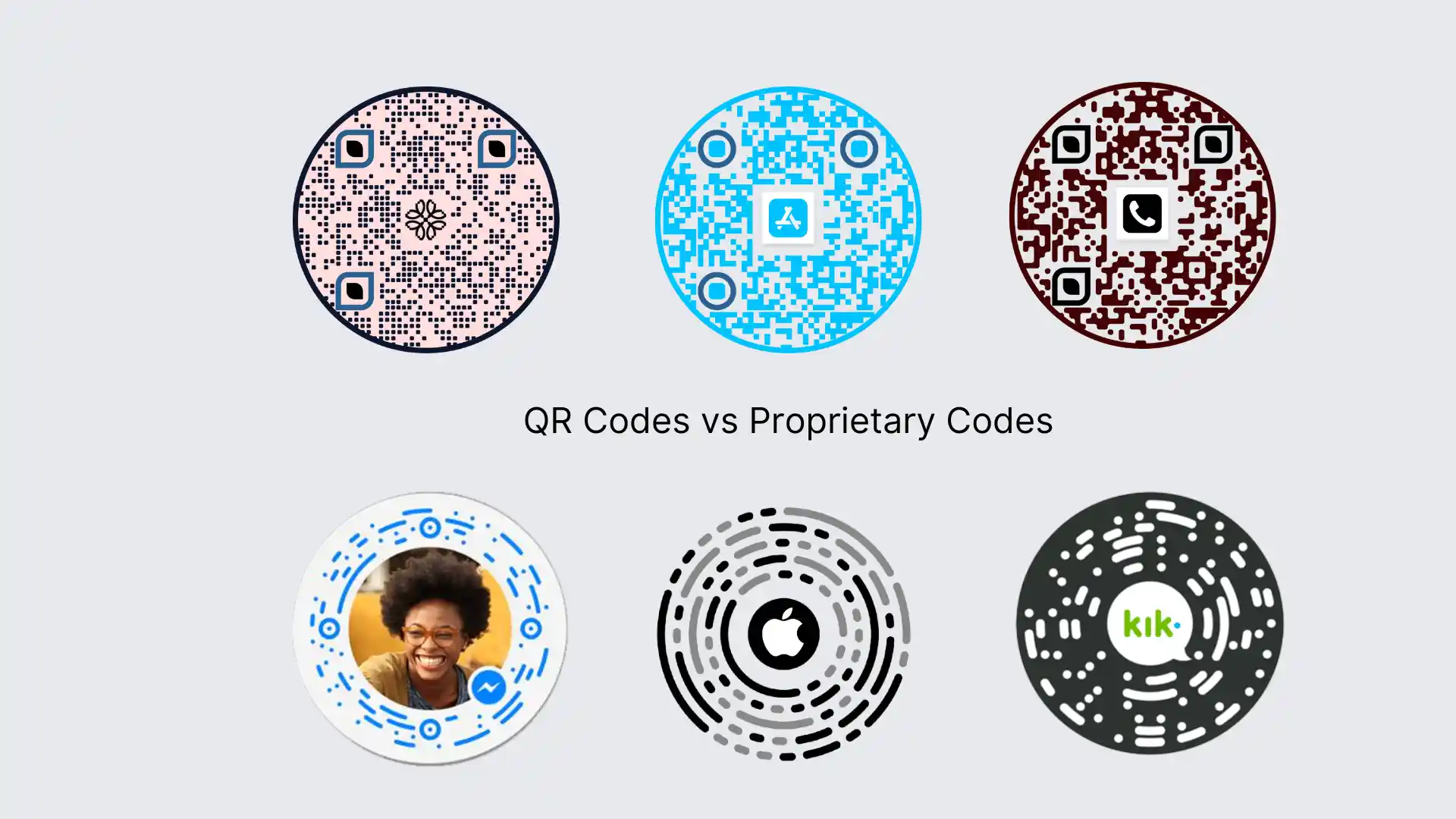
Not all circular machine-readable codes are standard QR Codes. But standard QR Codes can be circular.
Look at the images above 👆. Specialized platforms like Kik, Snapchat, Meta, and Apple Clips use proprietary codes. These codes have unique identifiers and work specifically with their respective applications.
These QR Codes often incorporate elements of the platform's branding or user experience, making them distinct (and restrictive) from standard QR Codes. You can rarely customize them or tweak how they work.
Standard QR Codes, on the other hand, follow a widely adopted standardized format that can work with any data, including websites, social media, URLs, text, contact information, etc. Best: They can be dynamic.
You can scan them using any mobile OS that supports QR Code scanning. Plus, you can customize these QR Codes to look any way you want, including adding an image in the background or a logo in the middle like proprietary codes.
Here's a table to understand the crucial differences between the two:
Property
QR Codes
Proprietary codes
Property
Standardization
QR Codes
Standardized, universally recognized
Proprietary codes
Non-standardized, specific to the platform
Property
Security
QR Codes
Premium QR Code generators like Uniqode offer robust security measures, such as GDPR, HIPAA, SOC® 2 , analogous scan detection, phishing detection, and more
Proprietary codes
Security solely depends on the company making such codes. Their technology is closed source, and they do not reveal the security measures
Property
Branding
QR Codes
You can customize a QR Code to closely match a brand’s design by adding a logo, brand colors, background, etc
Proprietary codes
Since they are built by the brand itself, they already match the platform's branding, not necessarily your brand
Property
End users usability
QR Codes
Easier to use as most mobile device cameras automatically detect QR Codes
Proprietary codes
Can be more complex to use and limited in scope as they require specific apps or software
Property
Data capacity
QR Codes
Can store a large amount of data, including URLs, text, and contact information
Proprietary codes
Often limited to a specific account or feature of the app of origin. Limited compared to QR Codes
Property
Editability
QR Codes
Dynamic QR Codes are editable
Proprietary codes
Difficult to edit after creation
Property
Data tracking
QR Codes
You can track scan data with dynamic QR Codes and monitor data such as total scans, device and OS details, scan location, and more
Proprietary codes
You can track data only if the platform allows
Property
Versatility
QR Codes
You can use them for various purposes: marketing, payments, and information sharing, etc
Proprietary codes
You can only use them for contact/device linking on one platform
Property
Compatibility
QR Codes
Compatible with a wide range of devices and apps: Android, iOS
Proprietary codes
May be limited to specific platforms or devices
Popular examples to use a circle QR Code
Here are some places where our customers use circular QR Codes;
1. Product packaging
You can add a customized circle QR Code on your product packaging. Your customers can scan the code to view a coupon, social media profile, landing page—or any URL you use.
2. Billboard or digital signage
If your brand design esthetics revolve around round shapes (psst…you’re a donut brand), you can use circle QR Codes on billboards or digital signage for subtle yet impactful branding.
3. On restaurant menus
Do you only offer burgers? Donuts? Coffee in round cups or any other circular food items? Why not make your restaurant menu QR Code circular? Your guests will surely appreciate the subtle rationale behind this.
4. On medals and round trophies
Adding a QR Code to medals and trophies that point to special accounts of the winners or information about the trophy holder is an ingenious use of QR Codes. Adding a circle QR Code in round medals:
Increases the aesthetic appeal
Prompts more people to scan
Increases the functional value of the medals
5. On bottle caps
Imagine scanning a round QR Code on a bottle cap that leads to a stunning landing page showing how the water in the bottle came from the frigid springs of the Himalayas! Immersive, right? A round QR Code on a bottle cap can be functional and aesthetically pleasing if used in relevant cases.
Best practices to ensure your round QR Codes are scannable
Here are certain things to keep in mind while making round QR Code:
1. Ensure high scannability after customization
While creating a circle QR Code, don't over-customize it and render the QR Code unscannable. Here are a few things professionals routinely follow:
Angle the QR Code correctly
Choose a contrasting background
Keep the QR Code clutter-free
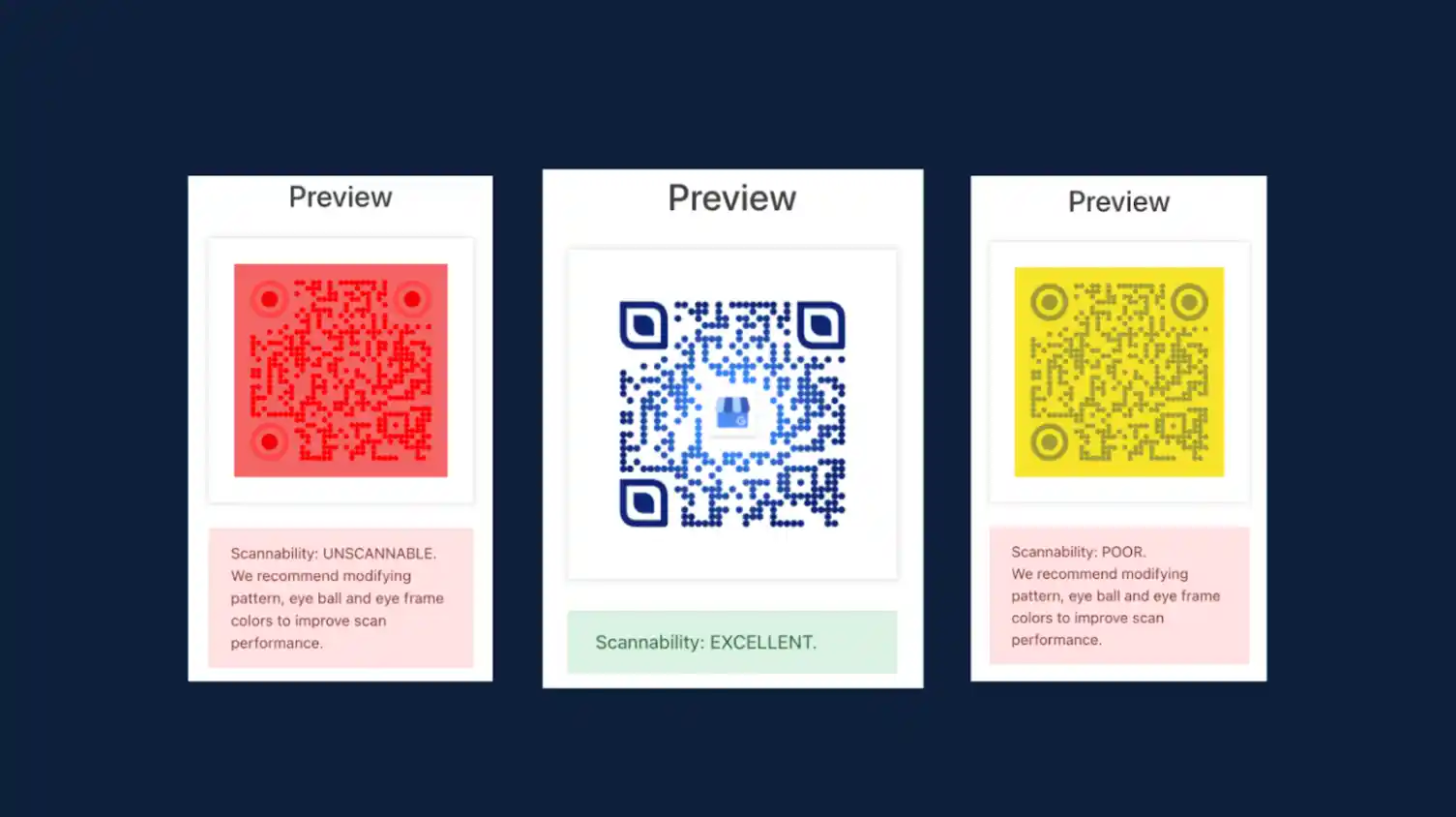
If you use Uniqode, you can gauge the scannability in real time while customizing. Keep an eye on the yellow box while designing the round QR Code.
2. Brand the round QR Code with logo
We always recommend creating a QR Code that users can recognize and trust. Your brand logo can help prospects ascertain the legitimacy of a QR Code and scan it without the fear of scams or fraud.
3. Place the circle QR Code appropriately
Your QR Code placement determines its success. Check if it has been placed correctly and is not obscured wholly or partially wherever you use it.
Sometimes, when you place a QR Code in the corners of packaging or in the middle of a tri-fold brochure, it is likely to be creased.
Hypothesize situations that your materials where you’re using the QR Code will undergo and place it where there is the least chance of it being affected.
4. Check the size of your QR Code
A QR Code is scannable only if its dimensions are perfectly sized. It should be a minimum of 1 cm x 1 cm.
Use this formula to determine the correct size for your QR Code:
QR Code size = Distance between the QR Code and the mobile device/10
Need help deciding the right size for your circle QR Code? Check out our detailed guide on QR Code size.


.webp)
.png)

.webp)



.webp)
.webp)
.webp)
